If your wellness program is open to invite family members, you will have the option in your main menu.
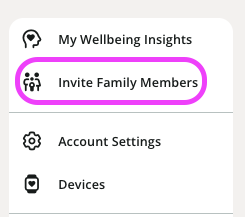
- Click on your profile icon in the upper right-hand corner
- From the drop-down menu select Invite Family Members
- Click the outlined Send an Invite button
- Enter your family member's information, the email address used must be unique, and not the same as the employee.
- Once all the fields are filled the Send Invitation button will be highlighted. Click Send Invitation.
- A registration email will be sent to the email address of the family member you just added, and they can set up their account through their own email address.
If your family member is already invited to the wellness program and not active, check the box next to their information and click Resend Invite.
Was this article helpful?
That’s Great!
Thank you for your feedback
Sorry! We couldn't be helpful
Thank you for your feedback
Feedback sent
We appreciate your effort and will try to fix the article