- From your profile menu, click My Device, and then select the option to connect to Fitbit. You will be redirected to the Fitbit site to enter your Fitbit account login credentials.
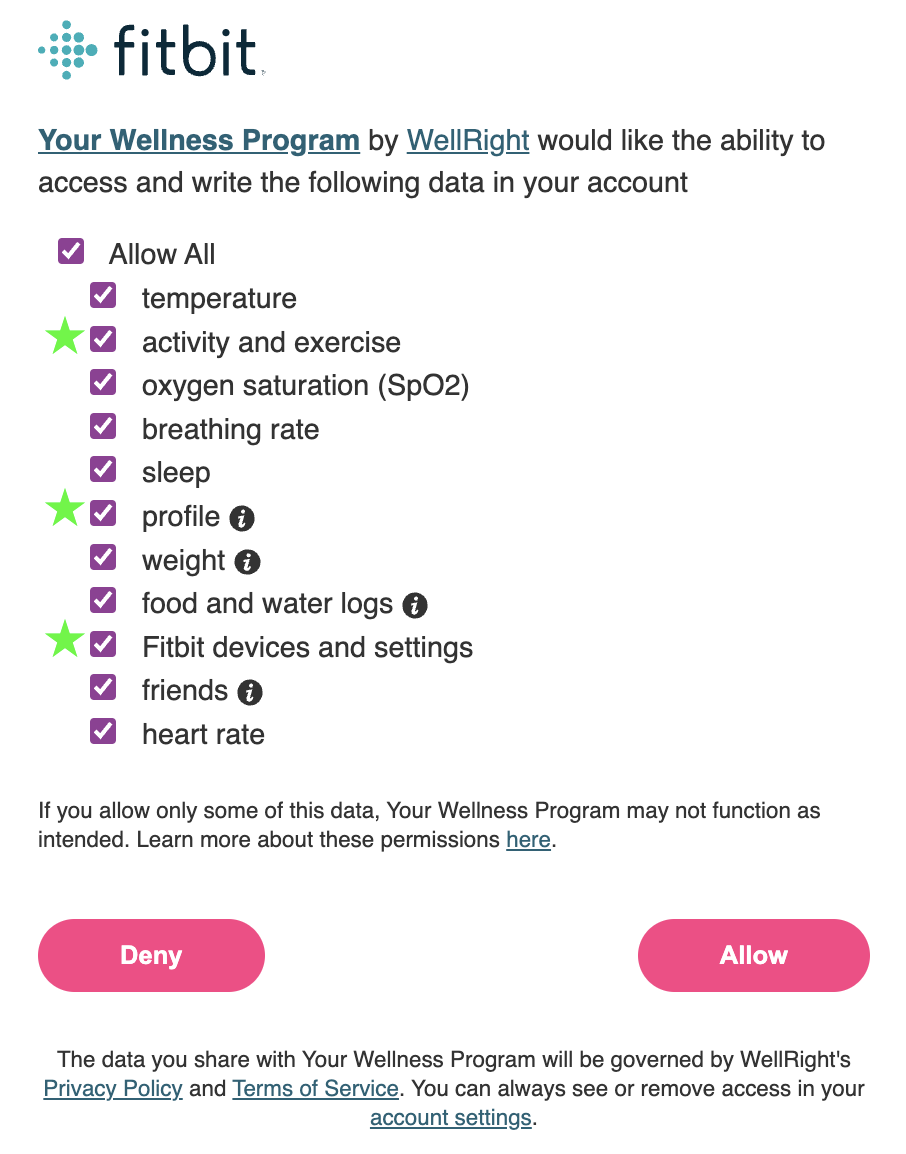
- Fitbit will ask which data types you would like to share. We recommend you select all data types. For step data to sync, at a minimum, the scopes: profile, Fitbit Devices & Settings, and activity and exercise must be selected. If these scopes are not selected, your step data will not sync.
- Allow up to 24 hours for your data to sync.
Please keep in mind that we are only able to pull the data from your Fitbit account and not directly from your wearable device. Always ensure your Fitbit device is syncing with your Fitbit account before expecting to see step data within your wellness account.
Was this article helpful?
That’s Great!
Thank you for your feedback
Sorry! We couldn't be helpful
Thank you for your feedback
Feedback sent
We appreciate your effort and will try to fix the article