To add a custom personal challenge, complete the following steps:
1. Scroll to the bottom of your Home or the Activities page and click Browse or Start a Personal Challenge
2. Select the challenge you would like to join and click Continue
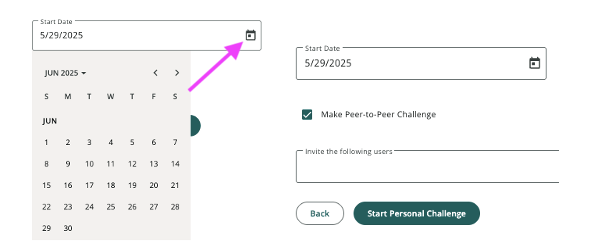
3. Confirm your preferred challenge start date. The end date will automatically be set for 30 days after the start date.
4. If you would like to make it a peer-to-peer challenge, select the box and invite other participants
5. Click Start Personal Challenge
Was this article helpful?
That’s Great!
Thank you for your feedback
Sorry! We couldn't be helpful
Thank you for your feedback
Feedback sent
We appreciate your effort and will try to fix the article